
Dashclock Extension Update + Floating Notification Extension Beta

I posted a new build of the DashClock Music Extension (1.7.0) that adds support for Amazon MP3.  If you install the update and are currently listening to a song in amazon mp3, you must change tracks before it will properly show up.

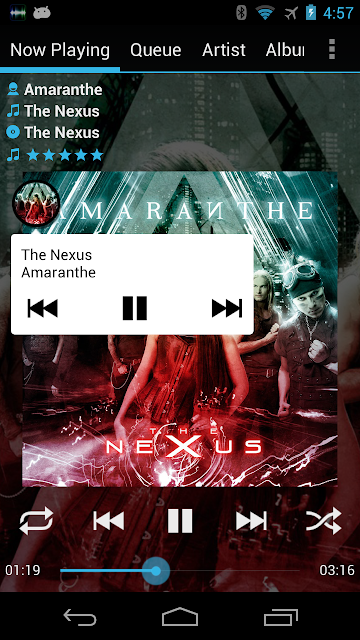
I also wanted to officially announce the beta of my Music Extension for Floating Notifications.   It will display the playing track and artist along with music controls.  There is also a pro upgrade you can purchase which will show album art instead of the play icon (this works for most players but just in case I provided a way to test to see if your album art shows up before purchasing the upgrade).  Please note you must download the beta of Floating Notifications as well.

How to join:
1) Join this G+ community: https://plus.google.com/u/0/communities/112403670127085453786
2) Join the beta: https://play.google.com/apps/testing/gonemad.fnmusicextension


Popular posts from this blog

GoneMAD Music Player 4.0 released and is now free!

GoneMAD Music Player 4.0 is now fully rolled out!  After 14 years since initial release as being a paid app, I've decided to try something different and switch to being free with ads.  The market is completely different nowadays compared to the early 2010s.  Ads are everywhere and users typically do not want to pay for apps / games / etc.  But don't worry, those users who previously purchased the unlocker or in app purchase unlock will continue to get an ad free experience.  New users will also have the option to purchase an in app purchase to permanently remove ads.   Note: There is a bug with 4.0 where users with the standalone unlocker may see ads when they first upgrade.  You typically fix this by just force stopping the app and restarting.  Ads should not come back after that.  Alternatively you can contact gonemadsoftware@gmail.com and I can help you out as well.  I have no intention on making users who already paid see ads. W...

1.4.8 - 24/96 + 24/192 FLAC support

Note that external dsp support is now off by default and you must enable it in the preferences. 1.4.8 (03/15/2013): -Improved resampling: sample rates higher than 48khz now supported and multi channel audio is now downmixed to stereo (for most formats) -Musepack file now play back at the correct volume -Fixed another issue with certain files playing back at incorrect speeds -Added /mnt/external_SD and /mnt/external to the default external sdcard location list -Added File Extension (%ext%) and Next File Extension (%next%) to the custom metadata options -Re-prioritized local image search to pick images named 'folder' first, then 'cover', then anything containing 'front' -Added skipping/stuttering warning when increasing the equalizer quality setting -Added option to toggle shuffle queue and collection individually to the gesture and singlebutton action list -Clicking on an album cover in the song list view will now follow the Song Actions preferences (...

4.1.6

4.1.6 has some fixes and one more significant change.  Previously if you decided to turn off the metadata text on the album grid so it only shows the artwork, this would force the same displayed metadata on views like artists -> albums.  Some users preferred to show a list of albums instead of the grid when filtering by artist / album artist / etc.  You can now set the metadata independently between the top level view and the filtered view like the images below. 4.1.6 (2025-12-12): Filtered album, artist, and albumartist list views displayed metadata can now be set independent of the top level list Prompt new users to add audio folders if less than 10 files detected in library Updated translations Fixed issue where multi folder albums scanner setting being off would still group albums in diff folders Fixed rare case where a tab would not load when using a very short custom tab name Fixed hebrew translation not showing up correctly on some devices Fixed bug where app op...